> For clean Markdown of any page, append .md to the page URL.
> For a complete documentation index, see https://docs.itential.com/llms.txt.
> For AI client integration (Claude Code, Cursor, etc.), connect to the MCP server at https://docs.itential.com/_mcp/server.
# Configure the NSO adapter
> Install itential_tools on NSO, configure the adapter-nso service config in Platform, and enable SSL.
The NSO adapter connects to NSO using the web UI port and NETCONF port. Each time the NSO adapter establishes a connection, it reads the service models advertised by NSO. To securely configure the NSO adapter, configure the HTTP hostname with the same hostname as the common name in the NSO server certificate.
* NSO needs to be installed on a server that Itential Platform can access.
* NSO does not need to be installed on the same server as Itential Platform.
* Refer to the [NSO Version Support policy](/itential-platform/install/platform#nso-support-policy).
## Adapter properties
| Property | Type | Description |
| --------------------------------- | ---------------- | ------------------------------------------------------------------------------------------------------------------------------------------------------------------------------------------------------------------------------------------------------------------------------------------------------------- |
| `http.host` | String | Host address of the NSO web interface. |
| `http.port` | Number | Host port of the NSO web interface. |
| `ssl.enabled` | Boolean | Use HTTPS instead of HTTP for relevant protocols (JSON-RPC and RESTCONF). The `http.host` and `http.port` properties still determine which host and port are used. This does not affect NETCONF connections. |
| `ssl.acceptInvalidCerts` | Boolean | Accept invalid certificates. |
| `ssl.caFile` | String | Certificate Authority file. |
| `ssl.ciphers` | String | SSL ciphers. |
| `netconf.host` | String | Host address of NSO NETCONF. |
| `netconf.port` | Number | Host port of NSO NETCONF. |
| `netconf.protocol` | String | Protocol used for NETCONF transactions. |
| `netconf.frame_size` | Number | NETCONF frame size to use. Default: `16736`. |
| `authenticationStrategy.type` | String | Set to `dynamic`. |
| `authenticationStrategy.location` | String | Set to `NSO`. |
| `authenticationStrategy.method` | String | Set to either `tokenLogin` or `machineLogin`. |
| `credentials.user` | String | NSO login account username. |
| `credentials.passwd` | String | NSO login account password. |
| `commitWait` | Number | Maximum timeout for a commit (in seconds). |
| `commitQueue` | Boolean | Indicates whether commit queues are enabled by default. |
| `poolSize` | Number | The default pool size. |
| `yangDirs` | Array of Strings | List of directories to scan for YANG. Directories can include the `*` wildcard. Only required when connecting to NSO versions earlier than 4.5.2. |
| `max_reconnect_attempts` | Number | The maximum number of times Itential Platform will try to connect to NSO before stopping. If both `max_reconnect_attempts` and `total_reconnect_window` are configured, whichever condition is met first sets the effective limit. Set to `0` to continue connecting indefinitely using a back-off algorithm. |
| `total_reconnect_window` | Number | A maximum reconnect window (number of minutes). If both this and `max_reconnect_attempts` are configured, whichever condition is met first sets the effective limit. Set to `0` for no time window. |
| `min_reconnect_interval` | Number | The number of seconds to wait once an NSO down event is detected before the first reconnection attempt. This value is doubled for each subsequent attempt until `max_reconnect_interval` is reached. |
| `max_reconnect_interval` | Number | When NSO becomes unavailable, Itential Platform starts its reconnect timer at `min_reconnect_interval`. If the first reconnect attempt fails, the timer doubles on each failure until it reaches or exceeds `max_reconnect_interval`. All future reconnect attempts occur at this frequency. |
| `netconfSubscriptions` | Array of Strings | List of NETCONF streams in NSO to listen for NETCONF events. |
| `entity_cache_TTL` | Number | The number of hours that device metadata entries are stored in the entity cache. Default: `24`. Set to `0` to disable device information caching. |
| `max_cache_entries` | Number | The maximum number of device metadata entries to store in the entity cache. Default: `5000`. |
### Sample configuration
The following sample configuration is provided for reference. Configure these properties: `http.host`, `http.port`, `ssl.enabled`, `ssl.caFile`, `ssl.ciphers`, `netconf.host`, `netconf.port`, `credentials.user`, `credentials.passwd`.
By default, the configuration uses `machineLogin` for all transactions. To have NSO handle individual user authorization, configure NSO with an external authentication script capable of returning external group memberships for a given user ID. Configure NSO for external authentication and set `authenticationStrategy.method` to `tokenLogin` instead of `machineLogin`.
```json
{
"id": "nso",
"type": "NSO",
"properties": {
"http": {
"host": "localhost",
"port": 8888
},
"ssl": {
"enabled": true,
"acceptInvalidCerts": false,
"caFile": "/etc/ssl/ca.cert",
"ciphers": "DHE-RSA-AES256-SHA"
},
"netconf": {
"host": "localhost",
"port": 2022,
"protocol": "ssh",
"frame_size": 16736
},
"credentials": {
"user": "admin",
"passwd": "admin"
},
"authenticationStrategy": {
"type": "dynamic",
"location": "NSO",
"method": "machineLogin"
},
"netconfSubscriptions": ["ncs-events", "ncs-alarms", "device-notifications", "service-state-changes"],
"commitWait": 30000,
"commitQueue": false,
"max_reconnect_attempts": 0,
"total_reconnect_window": 120,
"min_reconnect_interval": 30,
"max_reconnect_interval": 900,
"entity_cache_TTL": 24,
"max_cache_entries": 5000,
"poolSize": 3,
"yangdirs": []
}
}
```
## Itential Tools package compatibility with NSO
Two packages support various Cisco NSO versions in integration with Itential Platform: `itential-tools` and `itential-tools-nso6.4`.
If you have access to the `itential_tools` repository in Nexus, you can access both packages and install either based on your NSO version.
### itential-tools
`itential-tools` is compatible with NSO versions: 5.6.x, 5.7.x (LTS), 5.8.x, 6.0.x, 6.1.x (LTS), 6.2.x, 6.3.x.
### itential-tools-nso6.4
`itential-tools-nso6.4` is specifically built to support NSO 6.4 and above.
If you are using NSO 6.4 and above along with the `itential-tools-nso6.4` package, you must use one of the following minimum versions of `adapter-nso`:
* Platform 6.0.3 or later
* 2023.2.14 or later
* 2023.1.34 or later
### Itential Tools in the Nexus repository
The Nexus repository manager has two folder types: `itential_tools` and `itential_tools-64`. Each folder contains the assets and components that Itential Platform needs to interact with NSO.
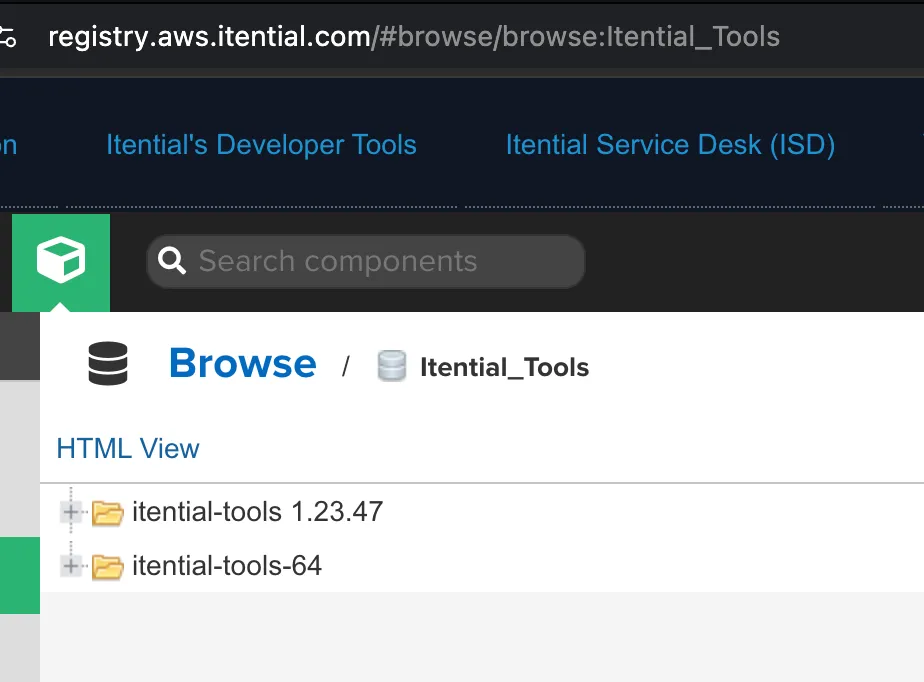
#### itential-tools 1.23.x
The `itential-tools 1.23.x` folder contains assets that support Cisco NSO versions: 5.6.x, 5.7.x (LTS), 5.8.x, 6.0.x, 6.1.x (LTS), 6.2.x, 6.3.x.
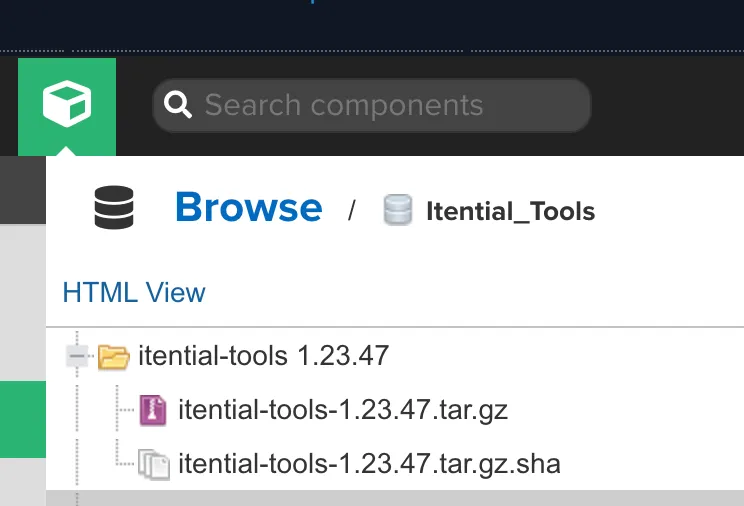
#### itential-tools-64
The `itential-tools-64` folder supports Cisco NSO 6.4.x and above, and contains `itential-tools-64-1.23.48`, which is the first package release of `itential-tools-64`.
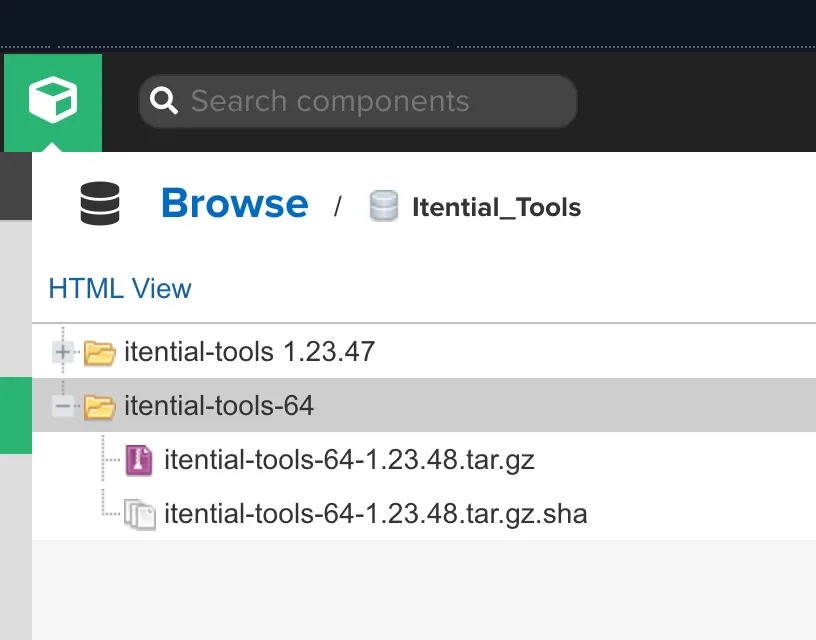
#### Download instructions
#### Change to the NCS packages directory
```bash
cd /var/opt/ncs/packages
```
#### Extract the itential-tools package
```bash
tar xzf itential_tools_VERSION.tgz
```
#### Run make in the src directory
```bash
cd itential-tools/src && make clean all -s && cd -
```
#### Perform a package reload using ncs\_cli
```bash
ncs_cli -u admin -C --noaaa > package reload
```
## NSO external authentication installation
To get started with external authentication, install the `ph-auth` script and then configure the `ncs.conf` file. The NSO external authentication script requires Python and the `requests` module.
Network connectivity is required between NSO and Itential Platform (typically port 3000) for use with the external authentication script.
#### Install Python and requests
```bash
yum install -y python python-pip
pip install requests
```
#### Configure the external authentication script
The script is found at:
```bash
/var/opt/ncs/packages/itential-tools/external_auth
```
#### Configure the hostname and port
Configure the hostname and port of the Itential Platform server:
```bash
PH_ADDRESS = "localhost"
PH_PORT = "3000"
```
#### Test the external authentication script
```bash
python /var/opt/ncs/packages/itential-tools/external_auth/ph-auth.py
```
#### Enter a test command
Type the following command and press Enter:
```bash
[test;test;]
```
#### Verify the result
You should receive the following result:
```bash
reject
```
## NSO external authentication configuration
Configure `ncs.conf` to use external authentication. Enable both `external-authentication` and either `location-authentication` or PAM. Itential Platform initially connects using a global service account with admin privileges.
For transactions bound to a specific user account, Itential Platform makes calls on behalf of that user (for example, `bobjones` instead of `admin`).
```bash
vi /etc/ncs/ncs.conf
```
```xml
${NCS_CONFIG_DIR}/ssh
false
system-auth
true
/var/opt/ncs/packages/itential-tools/external_auth/ph-auth.py
false
prompt
```
Restart NSO:
```bash
service ncs restart
```
### Configure default authgroup mappings
If you use the `tokenLogin` feature, verify that all users map to the correct southbound credentials. Run this command for each authentication group and set the appropriate device credentials as `remote-name` and `remote-password`.
```bash
ncs_cli -u admin -C
config
devices authgroups group default default-map remote-name admin remote-password admin
commit
```
### Sample NSO NACM rules
To use Itential Platform with an NSO NETCONF Access Control Model (NACM), refer to the sample NACM rules provided with this package.
The NACM rules assume the following groups model:
| Group | Description |
| ----------- | ----------------------------------------------------------------------------------- |
| `pronghorn` | A NACM group applied to the user the NSO adapter will use when connecting with NSO. |
| `users` | A NACM group applied to the user the NSO adapter will use when connecting with NSO. |
| `admins` | A NACM group applied to administrators of the system. |
These groups are shared across Itential Platform and NSO. Using the sample external authentication script, Itential Platform provides the groups defined in Itential Platform—discovered from the configured AAA system—to NSO for use in NACM rule-lists.
The groups returned by the NSO AAA provider must match the NACM rule-list group assignments.
The following rule-lists are provided in the sample rules:
| List | Description |
| ------------------ | --------------------------------------------------- |
| `pronghorn-system` | Applied to the Itential Platform `pronghorn` group. |
| `pronghorn-users` | Applied to the Itential Platform user groups. |
| `admins` | Applied to `pronghorn` and `admins` groups. |
Adjust the groups associated with these rule-lists to ensure they map to the correct user accounts.
### Install NACM rules in NSO
```bash
ncs_cli -u admin -C
config
load merge sample-nacm-rules.xml
commit dry-run
commit
```
### Configure device allowlists
The sample NACM rules include a rule-list for allowlisting devices to the users group. Configure the sample rule-list or create your own to associate devices with groups of users. To add devices to the users allowlist:
```bash
ncs_cli -u admin -C
config
nacm rule-list whitelist-devices rule permit-device-mydevicename path /devices/device[name='mydevicename'] action permit
commit
```
In a NACM-enabled system, any new device added to the system needs to have its groups defined at the time of device turn-up. This applies to both manual configuration of the devices in NSO and any device turn-up workflows turning up new devices on the network.
### Configure service allowlists
The sample NACM rules include a rule-list for allowlisting service instances to the users group. Configure the sample rule-list or create your own to associate services with groups of users.
To add all service instances for a model to the users allowlist:
```bash
ncs_cli -u admin -C
config
nacm rule-list whitelist-services rule permit-service-cisco-ios path /services/cisco-ios action permit
commit
```
To add a single instance to the users allowlist:
```bash
ncs_cli -u admin -C
config
nacm rule-list whitelist-services rule permit-service-cisco-ios-101 path /services/cisco-ios[vlan=101] action permit
commit
```
In a NACM-enabled system, any new service instance added to the system needs to have its groups defined. Service instances may be restricted to an individual group or made accessible to multiple groups with the appropriate NACM rules.
## NSO NETCONF events in workflows
You can configure workflows in Itential Platform to wait for Cisco NSO northbound NETCONF event notifications before proceeding.
Cisco NSO emits notifications over NETCONF for various system events. You can configure the NSO adapter to listen to NSO NETCONF event streams and the Itential Platform Event System to consume and process these events in a workflow.
### Configure NSO NETCONF event streams
Event streams are configured in NSO within the `ncs.conf` file. NSO allows the following event streams to be configured: `ncs-alarms`, `ncs-events`, `device-notifications`, `service-state-changes`, `NETCONF`.
This example shows how to configure an `ncs-alarms` event stream inside the NSO `ncs.conf` file:
```xml
ncs-alarms
NCS alarms according to tailf-ncs-alarms.yang
false
false
./state
S10M
50
```
Every stream that is configured must be defined within `ncs.conf` regardless of whether it supports replay. NSO logs notifications and a NETCONF client can ask for logged notifications if replay support is enabled.
### Configure the NSO adapter to listen to NETCONF streams
Configure the NSO adapter to specify which NSO NETCONF event streams to subscribe to. The event streams are defined in adapter properties using the `netconfSubscriptions` key. After updating adapter properties, restart the NSO adapter to begin listening to the configured streams. The `netconfSubscriptions` values must correspond to the NETCONF streams defined in `ncs.conf`.
Example configuration:
```json
{
"id": "NSO",
"type": "NSO",
"properties": {
"netconfSubscriptions": [
"ncs-events",
"ncs-alarms",
"device-notifications",
"service-state-changes"
],
"http": {
"host": "localhost",
"port": 8080
},
"netconf": {
"host": "localhost",
"port": 2022,
"protocol": "ssh"
},
"ssh": {
"port": 22
},
"credentials": {
"user": "admin",
"passwd": "admin"
},
"commitWait": 5000,
"commitQueue": false
},
"groups": [],
"brokers": ["device", "method", "service"]
}
```
### Workflow configuration
Use the Workflow Engine `eventListener` task to listen for events from applications and adapters deployed in the platform.
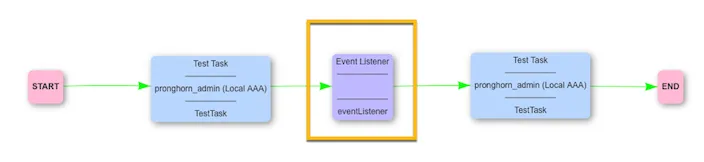
Refer to the **eventListenerJob task reference** for more information.
When a job is created, it processes all available tasks. When it reaches the `eventListener` task, it waits in a `running` state until it receives an event. You configure the specific event within the task.
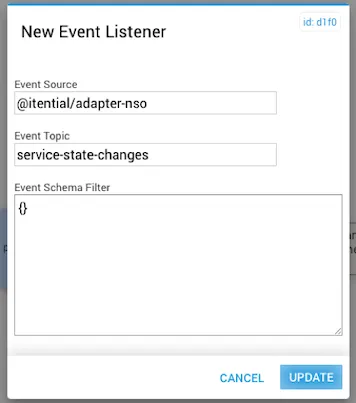
### Defined event listener inputs
| Input | Description |
| ------------------- | ----------------------------------------------------------------------------------------------------------------------------------------------------------------------------------------------------------------------------------------------------------------------------------------------------------------------------------------------------------------------------------------- |
| Event Source | The application or adapter that will publish the event. For NSO notifications the NSO adapter will be the source. As the adapter is deployed in the `@itential` namespace, provide the fully qualified location of the source. In most cases use `@itential/adapter-nso`. If you have multiple NSO adapters deployed, specify the correct adapter from which the event will be published. |
| Event Topic | The name of the topic to which the event will be published. For NETCONF this will be the name of the event stream. |
| Event Schema Filter | By adding a JSON schema to this field, the task can be configured to execute only when the event it receives contains specific data defined by the schema filter. The payload of the event will be compared with the JSON schema defined in this field, and the task will only process if there is a match. |
#### Event schema filter examples
The following example processes the `eventListener` task only when this payload is received:
```json
{
"eventTime": "2019-09-19T18:56:14.227091+01:00",
"plan-state-change": {
"service": {
"_": "/l3vpn:l3vpn-simple-svc[l3vpn:name='IAP']"
},
"component": "self",
"state": {
"_": "ncs:init"
},
"operation": "created",
"status": "reached"
}
}
```
The JSON schema for the **Event Schema Filter** is:
```json
{
"type": "object",
"properties": {
"eventTime": {
"type": "string",
"default": "2019-09-19T18:56:14.227091+01:00",
"examples": ["2019-09-19T18:56:14.227091+01:00"],
"format": "date-time"
},
"plan-state-change": {
"type": "object",
"properties": {
"service": {
"type": "object",
"properties": {
"_": {
"type": "string",
"default": "/l3vpn:l3vpn-simple-svc[l3vpn:name='IAP']",
"enum": ["/l3vpn:l3vpn-simple-svc[l3vpn:name='IAP']"]
}
},
"required": ["_"],
"additionalProperties": false
},
"component": {
"type": "string",
"default": "self",
"examples": ["self"]
},
"state": {
"type": "object",
"properties": {
"_": {
"type": "string",
"default": "ncs:init",
"examples": ["ncs:init"]
}
},
"required": ["_"],
"additionalProperties": false
},
"operation": {
"type": "string",
"default": "created",
"examples": ["created"]
},
"status": {
"type": "string",
"default": "reached",
"examples": ["reached"]
}
},
"required": ["service", "component", "state", "operation", "status"],
"additionalProperties": false
}
},
"required": ["eventTime", "plan-state-change"],
"additionalProperties": false
}
```
If there is no need to filter on the payload and you want the task to execute when it receives a specific Event Topic, set an empty JSON object `{}` in the Event Schema Filter field.
### Itential Tools Rules Engine
The Itential Tools Rules Engine lets you define scripts that run before NSO command sets are executed. These scripts add or change values in the NSO command sets before execution.
The rules engine has two parts: a rule engine and a script engine. The script engine reads the script files for the incoming command, then reads the defined rules and passes them to the rule engine for processing.
The following files are required:
| File | Name | Description |
| ------------ | -------------------------- | ----------------------------------------------------------------- |
| Command file | `dl_command.json` | Associates the command name to the script name. |
| Rule script | `.dls` | Defines the script. Generated by the user who creates the script. |
#### Development tools and libraries
| Testing tool | Description |
| ------------------------------------ | ----------------------------------------------------------------------------------------------------------------------------------------------- |
| [Mockito](https://site.mockito.org/) | A mocking framework for unit testing. |
| [TestNG](https://testng.org/) | A testing framework designed to cover all categories of testing, with support for annotations and concurrent testing. Requires JDK 7 or higher. |
#### System design
The Itential Tools Rules Engine has three functional areas: Script Engine, Rule Engine, and Script Validation Engine.
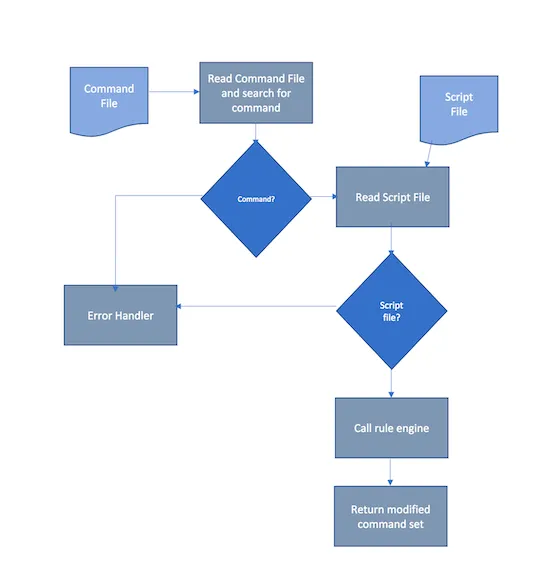
**Script Engine**
The Script Engine is the main driver for script processing. It receives the command file containing the request to modify the NSO command set. It performs the following steps:
* Read the command file.
* Locate the command to get the script file to execute.
* Read the script file to execute. This file contains the rules to run against the NSO command set.
* Call the rule engine to process the rules.
* Modify the NSO command set.
* Return the modified command set to the calling system.
Any errors are handled and returned to the calling system.
**Rule Engine**
The Rule Engine processes each rule. It takes the rule and NSO command set as input and returns the modified NSO command set as output. It performs the following steps:
* Receive parameters.
* Determine which rule to process.
* Process the rule and modify the NSO command set.
* Return the modified NSO command set.
* Pass any errors back to the Script Engine's error handler.
**Script Validation Engine**
The Script Validation Engine validates the script format and verifies that all commands have the correct number of parameters for their command type.
If validation fails, a custom Java exception is thrown with an error message and code, and passed back to the calling system.
| Validation | Description |
| -------------------- | ------------------------------------------------------------------------------------------------------------------ |
| Parameter (required) | Script name. |
| Checks | Each command must be terminated with a semicolon. Each command will be validated for a valid number of parameters. |
**Validation commands**
`$DLC_REPLACE` — four parameters:
* 1st — Any String
* 2nd — Any String
* 3rd — Int value
* 4th — Int value
`$DLC_INSERT` — five parameters:
* 1st — Any String
* 2nd — Any String
* 3rd — Before or After value
* 4th — Int value
* 5th — Int value
**Rule command format and usage**
| Usage | Format |
| ------------- | --------------------------------------------------------------------- |
| Replace | `$DLC_REPLACE("original string","new string", occurrence, num)` |
| Insert Before | `$DLC_INSERT("original string","new string",BEFORE, occurrence, num)` |
| Insert After | `$DLC_INSERT("original string","new string",AFTER, occurrence, num)` |
**Arguments**
| Argument | Description |
| ----------------- | ------------------------------------------------------------------------------------------------------------------------------------------------------------------------------------------------------------------------------------------------------------------------------------------------------------------------------------------------------------------------------- |
| `original string` | What the command is looking for. |
| `new string` | What will be added. Supports the following escape characters: `\t` (tab), `\n` (new line), `\r` (return). Also supports additional options as defined in "Supported options within the 'new string' argument" below. |
| `occurrence` | Number indicating the starting position of the original string before the rule begins executing. For example, if there are three instances of the original string and the occurrence is two, the command starts processing at instance two. |
| `num` | Number of times the action occurs (0 = all). For example, if there are four matches of the original string and `occurrence=3`, then only the first three original strings will have the replacement. **Note:** This works in conjunction with `occurrence` such that if `occurrence=3` and `num=3`, only two replacements would occur (the third and fourth), although `num=3`. |
**Supported options within the "new string" argument**
`$STRING`
Syntax: `$STRING['my string'|'2nd string'|'3rd string']`
* `$STRING` — A single value or an array of strings separated by a pipe (`|`) symbol that will be printed out. An array will cause a loop.
`$LOOP`
Syntax: `$LOOP[{start}-{end}|$STRING['{string to print out}']$LOOP_VAR]`
* `{start}:[int]` — The starting number of the loop.
* `{end}:[int]` — The ending number of the loop.
* `{string to print out}:[string]` — Any string to print out.
* `$LOOP_VAR:[int]` — The integer value of the current loop iteration. Multiple references to `$LOOP_VAR` are allowed.
Example:
```js
$DLC_INSERT("access-list","new text here",AFTER,1);
$DLC_INSERT("access-list","new text here",BEFORE,1);
$DLC_INSERT("","\n$LOOP[1-100|$STRING['vlan ']$LOOP_VAR]\n",AFTER,1,1);
$DLC_INSERT("","\n$STRING['my string'|'2nd string'|'3rd string']\n",BEFORE,1,1)
```
#### Implementation design
The Rule Engine implementation includes the following features:
* Integration into the `itential-tools` Java application.
* A mechanism to refresh the list of available commands without restarting `itential-tools`.
* An option to bypass the refresh feature.
* The ability for users to update commands and scripts.
**Rule Engine integration**
To integrate the Rule Engine into the `itential-tools` application, include the Java JAR file generated by the Rule Engine application in the `private-jar` or `shared-jar` directory.
Import the `com.itential.datalore_utils.ScriptEngine` package into the calling class:
```js
import com.itential.datalore_utils.ScriptEngine;
ScriptEngine scriptEngine = new ScriptEngine(sCommand, sNSOCommandSet);
try {
sNSOCommandSet = scriptEngine.processCommand();
} catch (Exception e) {
e.printStackTrace();
}
```
**Integration features**
| Feature | Description |
| ----------------------------- | ----------------------------------------------------------------------------------------------------------------------------------------------------------------------------------------------------------------------------- |
| Refresh command list | The command list is re-read every time processing of the command is executed. |
| Bypass option | A configuration parameter called `bypassRuleEngine` can be defined for `itential-tools` and passed to it. If this parameter is not passed to `itential-tools`, a default value of `TRUE` is set and this feature is bypassed. |
| Update command/script by user | In the first release, all commands/scripts will be manually created/edited and copied to the installed location. No UI will be available in the initial release to support script manipulation. |
## Configure NSO for SSL
### NSO SSL configuration
#### Upload certificates
Upload NSO host and CA X.509 certificates to the NSO host `$CERT_DIR`.
#### Copy the host private key and signed certificate
```bash
NCS_CONFIG_DIR=/etc/ncs
cp $NSO_SERVER_PRIV_KEY $NCS_CONFIG_DIR/ssl/cert/host.key
cp $CERT_DIR/$NSO_SERVER_CERTIFICATE $NCS_CONFIG_DIR/ssl/cert/host.cert
```
#### Trust the CA certificate
Adjust for your platform. These instructions apply to a CentOS 7 host.
```bash
cp $CA_SELF_SIGNED_CERT /etc/pki/ca-trust/source
update-ca-trust
```
#### Edit the configuration file
```bash
/etc/ncs/ncs.conf
```
#### Enable SSL for NSO REST and JSON-RPC APIs
```xml
true
0.0.0.0
8888
${NCS_CONFIG_DIR}/ssl/cert/host.key
${NCS_CONFIG_DIR}/ssl/cert/host.cert
```
#### Enable NETCONF
```xml
true
true
0.0.0.0
2022
false
127.0.0.1
2023
```
#### Restart NSO
Refer to Cisco NSO Admin and Installation guides for detailed instructions on NSO SSL configuration.
### Itential Platform NSO SSL configuration
#### Upload the CA certificate
```bash
CERT_DIR=/etc/ssl/certs
CA_SELF_SIGNED_CERT=${CERT_DIR}/certificate_authority.crt
NSO_HOST=nso-hostname
```
#### Update the NSO adapter configuration
Update your desired NSO adapter under **Settings > Services > Adapters** with the following configuration:
```json
{
"loggerProps": {
"description": "Logging",
"log_max_files": 10,
"log_max_file_size": 10485760,
"log_level": "debug",
"log_directory": "/var/log/pronghorn",
"log_filename": "my_nso.log",
"log_timezone_offset": 0,
"console_level": "info",
"syslog": {
"level": "info",
"host": "10.1.0.211",
"port": 1514,
"protocol": "udp4",
"facility": "local0",
"type": "BSD"
}
},
"isEncrypted": true,
"model": "@itential/adapter-nso",
"name": "my_nso",
"type": "Adapter",
"properties": {
"id": "my_nso",
"type": "NSO",
"properties": {
"http": {
"host": "nso-hostname",
"port": 8888
},
"ssl": {
"enabled": true,
"acceptInvalidCerts": false,
"caFile": "/etc/ipa/ca.crt",
"ciphers": "ECDHE-RSA-AES128-GCM-SHA256"
},
"netconf": {
"host": "nso-hostname",
"port": 2022,
"protocol": "ssh"
},
"ssh": {
"port": 22
},
"credentials": {
"user": "nso_user",
"passwd": "nso_pass"
},
"authenticationStrategy": {
"type": "dynamic",
"location": "NSO",
"method": "tokenLogin"
},
"commitWait": 5000,
"commitQueue": false,
"max_reconnect_attempts": 0,
"total_reconnect_window": 0,
"min_reconnect_interval": 30,
"max_reconnect_interval": 900
},
"groups": [],
"brokers": ["device", "method", "service"]
}
}
```
While updating the cipher in SSL properties, you can use the preferred cipher in your SSL handshake with the following command from Itential Platform server:
```
$ openssl s_client -connect NSOServer.com(localhost):portNumber(8080)
```
In the example below, the preferred cipher is `ECDHE-RSA-AES128-GCM-SHA256`:
```
SSL-Session:
Protocol : TLSv1.2
Cipher : ECDHE-RSA-AES128-GCM-SHA256
Session-ID: 1A1D51D03BFB624A617626DCEEDACAF6AD0317DF9C34DF7F55802BAA776EC112
Master-Key: 4B7827941C
Start Time: 1595966521
Timeout : 7200 (sec)
Verify return code: 0 (ok)
```
## NSO LSA setup
The following principles apply to the NSO adapter in an NSO LSA architecture:
* Itential does not support multiple NSO instances having **devices** of the same name. Only one NSO instance manages a given device, and no other devices use that exact same name.
* Itential does not support multiple NSO instances having **service models** of the same name/path. Only one NSO instance manages a given service model, and no other service models use that exact same name/path.
For the following LSA architecture:
1. An "upper" NSO service that has service models defined.
2. One or more "lower" NSO services that connect to devices.
Set up Itential Platform as follows:
1. Create an `adapter-nso` instance and point it to the upper node.
2. Create an additional `adapter-nso` instance for every lower node and point it to a lower node.
With this setup, you can use service models (for example, with tasks such as `saveInstances`) and perform device management (for example, with Configuration Manager).
NSO can also use an Itential Platform broker to support this setup. When you use an app task like `saveInstances`, provide the device name to the task. The Itential Platform broker queries all `adapter-nso` instances to find which one has that service model and uses that instance. The same principle applies to any tasks that interact directly with devices. For example, the golden config feature in Configuration Manager uses a broker to determine which `adapter-nso` instances manage each device.